

A Google Ad Manager account that has run for two or three years without a structured audit almost always carries dead inventory: orphaned ad units no header bidding request references, line items with zero impressions still set to "active", and pricing rules that override each other in an order nobody remembers creating. We see these patterns constantly when publishers onboard with us, and the revenue impact is rarely a rounding error. Stale line items compete in the dynamic allocation auction with floors that no longer match the market, and unfiltered ad units leak impressions to low-value demand. This article gives you a checklist you can run in a single working session, or split across a week, to bring your GAM setup back to a clean, verifiable state.
The checklist below assumes you have Administrator or at least full trafficking and reporting access in Google Ad Manager. Work through it top to bottom, because later sections depend on decisions you make in earlier ones: you cannot audit pricing rules sensibly until your inventory structure is sound, and you cannot judge ad quality until you know which paths actually serve.
Section 1: Inventory Structure and Naming Conventions
Start the audit where every impression begins: the ad unit tree. Google defines the core building blocks of Ad Manager, including networks, ad units, orders and line items, in its Ad Manager key concepts documentation, and your first task is to verify that your account still matches that model in practice.
Check these items:
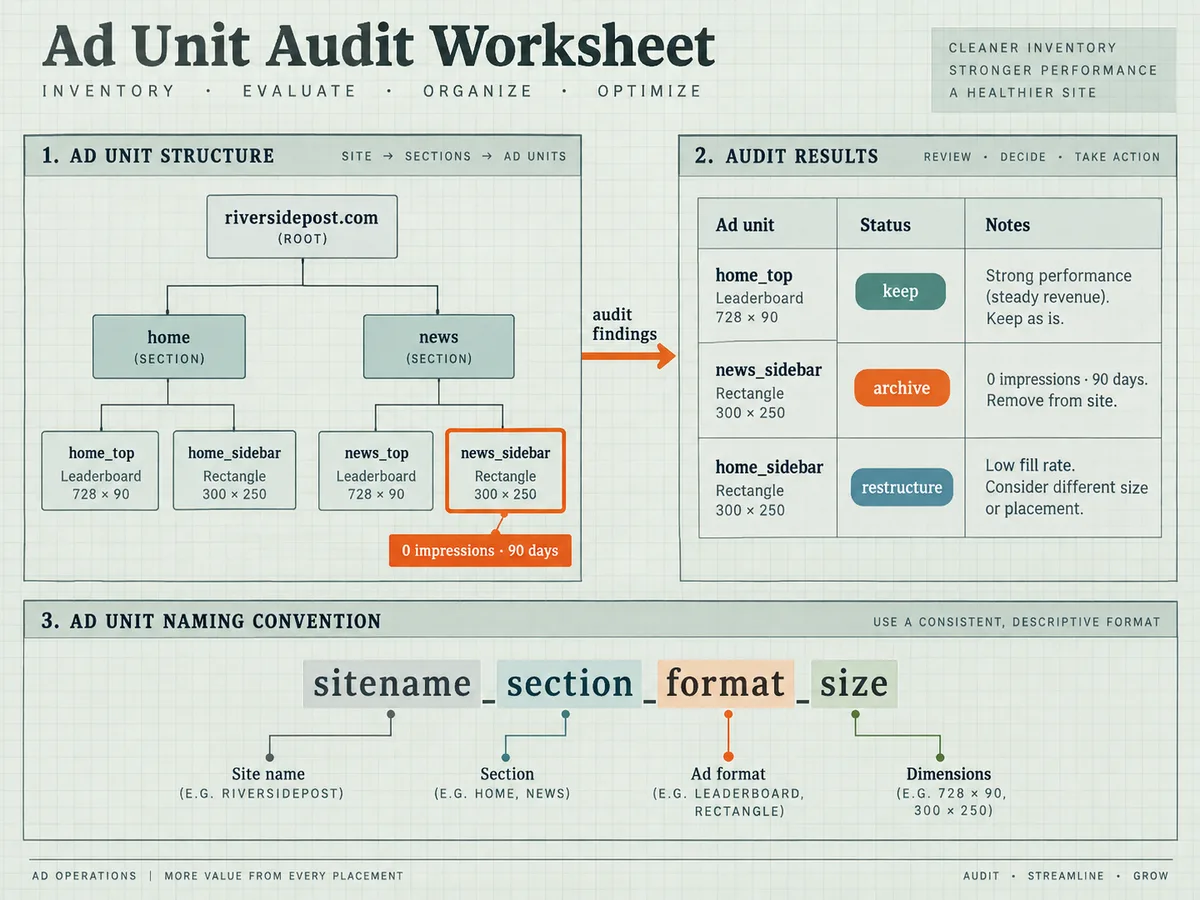
- Every ad unit in the tree maps to a live slot on your site or app. Export the full ad unit list from the inventory tab and diff it against the slots your pages actually define. Flag any ad unit with zero impressions over the last 90 days.
- The hierarchy is logical and mirrors your page structure. A common failure mode is a flat tree where every unit sits at the root, which forces you to manage targeting and reporting through endless key-value filters instead of the hierarchy itself.
- Naming conventions are consistent and machine-readable. A pattern like
sitename_section_format_sizelets you parse performance in a spreadsheet without manual cleanup. Mixed conventions, abbreviations that only the person who left the company understood, and inconsistent separators all cost you time in every later step of this audit. - Placements group ad units that advertisers should buy together. If your placements list is empty, or contains groups nobody has targeted in a year, fix that now. Google's guidance on planning your inventory structure describes how ad units, placements and key-values organize your slots for targeting and reporting, and that triad is exactly what you are auditing here.
- Key-values carry a documented purpose. Every custom key-value should have an owner, a definition, and a reason it exists. Free-form key-values accumulate like sediment, and each one adds latency to targeting evaluation on every single request.
Document what you find. Create a simple spreadsheet with columns for ad unit, status (keep, archive, restructure), and notes. This sheet becomes your working plan for the rest of the audit, and you will update it in every section that follows.
Section 2: Orders, Line Items and Creative Hygiene
Trafficking debt is the most common source of lost revenue in mature GAM accounts. Google's Ad Manager elements guide lays out the managed elements of the system: orders, line items, creatives and targeting. Audit each element class separately, because the failure modes differ.
For orders and line items, run these checks:
- No line item sits in "active" or "ready" status with zero lifetime impressions and an old start date. These are usually abandoned tests. Archive them, because some still consume auction slots and pollute delivery forecasts.
- No line item has an end date more than a year in the past but remains active. This happens surprisingly often after a campaign extension request that nobody reverted.
- Every active line item has a real priority that reflects its commercial importance. Check for house or remnant line items sitting at high priority, which can crowd out paying demand when dynamic allocation misfires.
- Line item types match their actual use. Network and Sponsorship line items serve with priority guarantees, Standard line items serve with volume goals, and Price Priority line items fill remnant. A direct deal trafficked as Price Priority because someone copied an old line item will underdeliver and nobody will notice without this audit.
- Frequency caps make sense per line item and per campaign. Uncapped house campaigns and capped direct deals are both red flags worth investigating.
For creatives, check these items:
- Every creative in rotation has a recent impression count. Zero-impression creatives usually indicate a broken creative assignment or a targeting conflict.
- Creative sizes match the slot sizes on the ad units they target. A 970x250 creative trafficked against a unit that only declares 728x90 will never serve, and the line item will look like a pacing problem instead of a configuration error.
- Third-party creative tags use current, supported tag formats and load over HTTPS. Legacy iframe tags from old campaigns frequently break silently when vendors rotate their endpoints.
- VAST creatives for video inventory reference valid endpoints and include error-tracking pixels where your deals require them.
Close this section by archiving everything you flagged, then re-export the line item list. The diff between the before and after exports is your first concrete audit deliverable, and it usually surprises people: mature accounts routinely retire 20 to 40 percent of their line items in this step.
Section 3: Targeting Consistency and Key-Value Hygiene
Targeting errors rarely stop delivery entirely, which is exactly why they persist. A line item that targets the wrong key-value still serves, just against the wrong audience, and the campaign performs poorly for reasons nobody can diagnose.
Check these targeting items:
- Every active line item's targeting expression matches the campaign's documented intent. If you have no documentation, that finding belongs in your audit report on its own.
- Key-value predicates use exact matches where the business logic requires exact matches, and the values are spelled consistently. A key-value for section targeting with values "news", "News" and "news_page" splits one audience into three and breaks advertiser targeting.
- Ad unit targeting references the current tree, not archived units. Line items that target archived ad units still evaluate those predicates on every request.
- Geotargeting, device targeting and dayparting settings match what the advertiser bought. Compare the insertion order against the line item settings line by line for your top ten revenue campaigns.
- No line item accidentally excludes your highest-traffic ad units. This happens when someone clones a campaign and forgets to widen the ad unit targeting after a site redesign.
Section 4: Delivery, Pacing and Forecast Health
Once trafficking is clean, evaluate whether the account delivers against its commitments. Delivery problems compound quietly: one underdelivering Sponsorship line item can distort the entire auction for weeks.
Audit these delivery items:
- Top direct campaigns delivered within a reasonable band of their goals over the last quarter. Pull the line item delivery report, compare actual impressions against goal impressions, and flag anything below 80 percent or above 120 percent.
- Underdelivery has a diagnosed cause, not just an observed symptom. Common causes include overly restrictive targeting, competing high-priority line items, creative size mismatches and inventory shortfalls on the targeted segments.
- Forecasting produces believable numbers. Run a forecast for a hypothetical campaign targeting your main placements and check that the available inventory figure roughly matches your actual traffic. Persistent over-forecasting usually means the forecast model sees ad units that no longer receive traffic, which points back to Section 1.
- No priority inversion exists in the delivery queue. Pull the "order of delivery" view for your main ad unit and confirm that house and remnant line items rank below all paying demand.
- Roadblocking settings, where you use them, still match your current page layout. Roadblocks configured for a layout you redesigned two years ago will never fill and will block otherwise eligible demand.
Section 5: Pricing Rules and Floor Configuration
Pricing is where audits pay for themselves fastest. Floor prices that no longer match market clearing levels either leave money on the table or block demand entirely, and both failure modes look identical in a revenue report unless you dig in.
Check these pricing items:
- Unified pricing rules cover every ad unit and format that participates in dynamic allocation. Any unit without an explicit rule inherits a default, and defaults drift out of date faster than rules people actively maintain.
- Floor values reflect current bid distributions, not the market of two years ago. Pull your bid-level data from header bidding and from Ad Exchange reporting, and compare the floors against the 60th to 80th percentile of observed bids per unit and per geo. Floors set far above observed bids throttle fill; floors set far below leave the auction to clear on its own with no protection.
- No conflicting rules overlap on the same ad units. Overlapping rules resolve by a defined precedence, but that precedence is easy to forget, and the effective floor on a given unit may come from a rule you did not expect. 3b. Price granularity matches your traffic scale. Accounts with modest traffic should not run hundreds of discrete floor values, because each floor bucket needs enough auctions to produce statistically meaningful results.
- Floor experiments use holdout groups rather than before-and-after comparisons. Seasonality, campaign flight dates and traffic mix changes will contaminate any A/B comparison that runs sequentially.
- The Ad Exchange settings for dynamic allocation use the correct floor logic for your setup, and nobody has enabled a legacy setting that overrides your unified rules.
We treat pricing audits as a standing task rather than a one-time fix, and we revisit floors quarterly because clearing prices shift with demand seasonality. If you run our stack, the revenue analytics we provide include bid distribution views per ad unit, per country and per device, which turns this section from a spreadsheet exercise into a fifteen-minute review.
Section 6: Ad Quality, Filtering and Brand Safety
Ad quality failures cost publishers in three ways: users install blockers, advertisers blacklist your inventory, and churn increases. Google gives you the filtering controls, but they only work if someone configures and maintains them, and configuration drifts.
Audit these ad quality items:
- Ad content filters reflect your current editorial standards. Review the category blocks, sensitive category settings and ad review preferences, and confirm they match the policy your editorial team actually enforces.
- Creative review settings catch the formats your users complain about. If your support inbox fills with complaints about autoplaying audio or interstitials on mobile, the corresponding controls are either off or set too permissively.
- The ad experience report status for your domains is clean. Abusive ad experiences suppress demand from buyers who check that status programmatically.
- Your own brand safety controls and any third-party filtering layers still cover every ad unit, including units you added since the last review. New slots launched during a redesign frequently skip the filtering configuration entirely.
- Unwanted creative categories, including malware-labeled ads and misleading buttons, trigger alerts rather than silent serves. Set up creative-level reporting so you can identify the source path of any complaint within minutes.
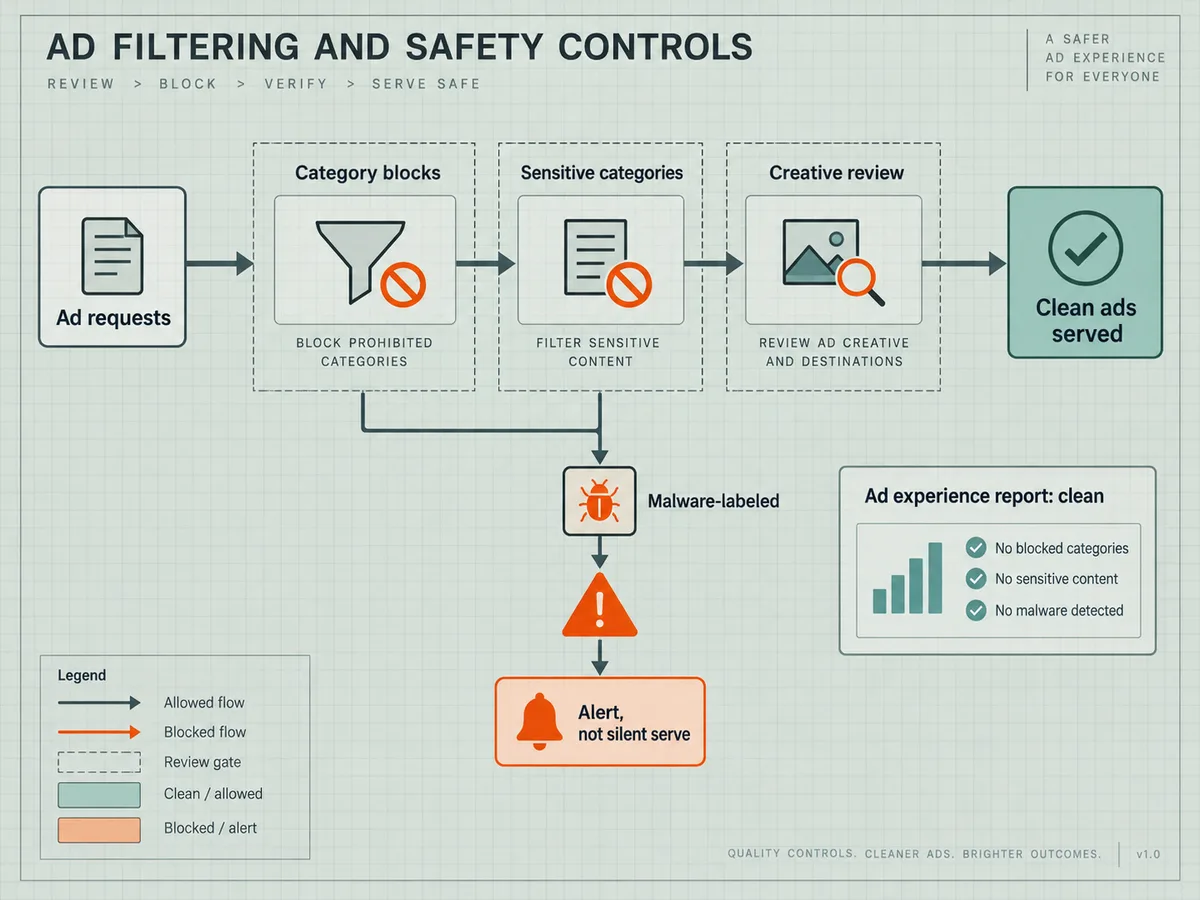
We hold our own demand to strict quality standards and filter unwanted ads before they reach publisher inventory, so publishers who route demand through us inherit that screening layer. But you still need your own GAM-side controls in order, because direct deals and other demand paths bypass any external filtering.
Section 7: Technical Plumbing: ads.txt, sellers.json and SupplyChain
Authorized buyers and exchanges verify your inventory through a chain of public files and objects, and a single stale entry in that chain can suppress bids across entire demand sources. Audit the plumbing with these checks:
- Your ads.txt file lists every authorized seller, including the MCM partner entries if you monetize through Google MCM. Remove dead entries, because buyers treat an ads.txt mismatch as a reason to skip your inventory, not just to discount it.
- Your app inventory carries a correct app-ads.txt file for app-ads.txt compliant demand, if you monetize apps.
- Your sellers.json entry under each selling platform publishes the correct publisher type and domain relationships, so buyers can verify you as the direct seller rather than an intermediary.
- The SupplyChain object in your header bidding requests includes every hop in the resale chain accurately. Prebid and Prebid Server generate this object from your configured sellers, so a misconfigured seller list propagates directly into the bid requests that exchanges evaluate.
- OpenRTB bid requests from your stack carry consistent site IDs, app bundle identifiers and inventory identifiers that match what your demand partners have registered. Mismatches here cause silent bid suppression that looks like a demand-side problem.
- Your Prebid.js configuration references only bidders you actually have live relationships with, and each bidder alias maps to the correct adapter. Dead adapters add latency to every auction and serve no purpose.
Section 8: Reporting, Reconciliation and Revenue Verification
An audit that ends at configuration is only half an audit. The final section verifies that money moves correctly and that your reporting reflects reality.
Check these reporting items:
- Google Ad Manager revenue reports reconcile with payments received over the last two quarters, within a tolerance you can explain. Investigate any gap beyond normal timing differences.
- Your payment profile, tax details and bank information are current, because stale payment data causes delays that have nothing to do with ad serving.
- Report scheduling delivers key reports to the people who need them, and nobody receives reports they ignore. A report nobody reads is a maintenance liability.
- Saved reports cover the dimensions that matter for this audit: revenue by ad unit, by geo, by device and by demand path. You will reuse these saved reports in your next quarterly audit, so build them properly now.
- Your revenue splits between direct sales, AdX and open market demand match your expectations. A shift in that mix, even at constant total revenue, signals changes in the auction that deserve investigation.
- If you work with supply-side platforms, you reconcile their reported figures against your GAM numbers monthly. Reconciliation gaps usually trace back to duplicate counting, differing time zones or unfilled requests counted differently, and each of those has a fix.
Section 9: Turning the Audit into a Cadence
A one-time audit decays. Line items accumulate, floors drift, and new ad units launch without filters. The practical fix is a cadence: run the full checklist quarterly, and run a reduced version, covering Sections 5, 6 and 7, monthly.
Structure your cadence around three artifacts. First, the inventory spreadsheet from Section 1, which you update whenever you add or retire ad units. Second, the line item export from Section 2, which you re-export each quarter to catch trafficking debt before it compounds. Third, a reconciliation record from Section 8, which turns revenue verification from an investigation into a routine check.
If you want an external pair of eyes, the WireAds publishers desk reviews publisher setups as part of onboarding, and we combine Prebid, OpenRTB, Google MCM and AdX demand with direct deals from global and local agencies so that all demand bids against your inventory in one auction. We work CPM-based, pay Net 30, and operate in every country with Google monetization across web, app and CTV. Bring your completed checklist when you talk to us, because a publisher who knows their own setup negotiates from a stronger position, and the audit you just ran is exactly that knowledge.