

Yield groups decide which programmatic demand sources compete for your impressions in Google Ad Manager, and how much protection each one gets. A publisher running three exchanges through a single misconfigured yield group can lose 15 to 30 percent of potential revenue compared to a setup with correct floor strategy and separate competition tiers. The mechanism is simple: a yield group is a container that tells GAM which partners can bid on which inventory, in which format, at what minimum price. The execution is where most setups fail. This guide walks through the full process: prerequisites, construction, QA, and the measurement loop that turns a static configuration into a revenue system.
What Yield Groups Actually Control
A yield group is not a line item and it is not a targeting rule. It is a grouping of demand sources, either Open Bidding partners, mediation networks, or Ad Exchange itself, that compete against each other within the unified auction for a defined slice of inventory. Google's own documentation on how to create and manage yield groups states that yield groups target Ad Exchange, Open Bidding or mediation for chosen inventory, which means every yield group you build answers three questions: which partners, which inventory, and which formats.
The critical concept is the unified auction. When an impression becomes available, GAM runs a single auction that includes your guaranteed line items, house ads, Ad Exchange demand, and any Open Bidding partners connected through yield groups. Open Bidding partners compete in the unified auction with their bids evaluated against everything else, as covered in Google's documentation on yield groups in the unified auction. A partner's bid only wins when it beats every other eligible bid, including the dynamic allocation floor from AdX.
This is why yield groups matter more than most publishers assume. If you connect a demand partner through Open Bidding without a floor, that partner competes at zero minimum and typically only wins impressions nobody else wanted. If you set floors intelligently, you force partners to pay real prices on the inventory segments where they have genuine advertiser demand. Yield groups are, in effect, your price control layer for third-party programmatic demand inside GAM.
One more distinction before building anything. Yield groups do not replace header bidding. If you run Prebid.js on the page, your header bidding demand arrives as line items in GAM and competes in the same unified auction as your yield group partners. The two systems coexist, and most sophisticated publishers run both: header bidding for transparent, direct demand connections, and yield groups for partners that require Open Bidding's server-side integration. Our header bidding setup guide covers the client-side half of that stack, and this article covers the server-side half.
Prerequisites Before You Build a Yield Group
Before touching the yield groups interface, verify four things, because each one silently breaks the setup if it is wrong.
First, confirm your account structure. Yield groups live at the network level in GAM, and you need administrator permissions to create or edit them. If you operate under Google MCM (Multiple Customer Management) as a managed publisher, your managing partner controls which Open Bidding partners are available, and you may need to request specific partners before you can add them to a group. We work with publishers across both direct GAM accounts and MCM hierarchies, and the yield group mechanics are identical once the partner list is populated.
Second, verify your inventory taxonomy. Yield groups target by ad unit, key-values, and placement, so your ad unit hierarchy needs to be clean before you segment demand. A common failure mode is targeting a parent ad unit when the trafficked inventory lives on child units, which produces a yield group with 100 percent no-bid behavior. Map every ad unit that carries volume before you start.
Third, check that each partner you plan to add has completed its integration on the GAM side. Open Bidding partners appear in the partner list only after the integration is enabled for your network, which usually involves the partner requesting access through Google. Mediation partners require linked mediation credentials for app inventory. If a partner does not appear in the picker, the integration is not active, and no amount of yield group configuration will summon it.
Fourth, confirm your ads.txt file reflects every partner you intend to add. An Open Bidding partner that wins an auction but is absent from ads.txt gets its bids rejected at the exchange level, which shows up as depressed fill with no obvious error in the GAM UI. The sellers.json and SupplyChain object entries for those partners also need to be correct, because buyers increasingly discount or reject supply with incomplete chain-of-custody data. We audit ads.txt and sellers.json for every publisher before connecting them to our SSP, precisely because this step determines whether connected demand can actually transact.
Building the Yield Group, Step by Step
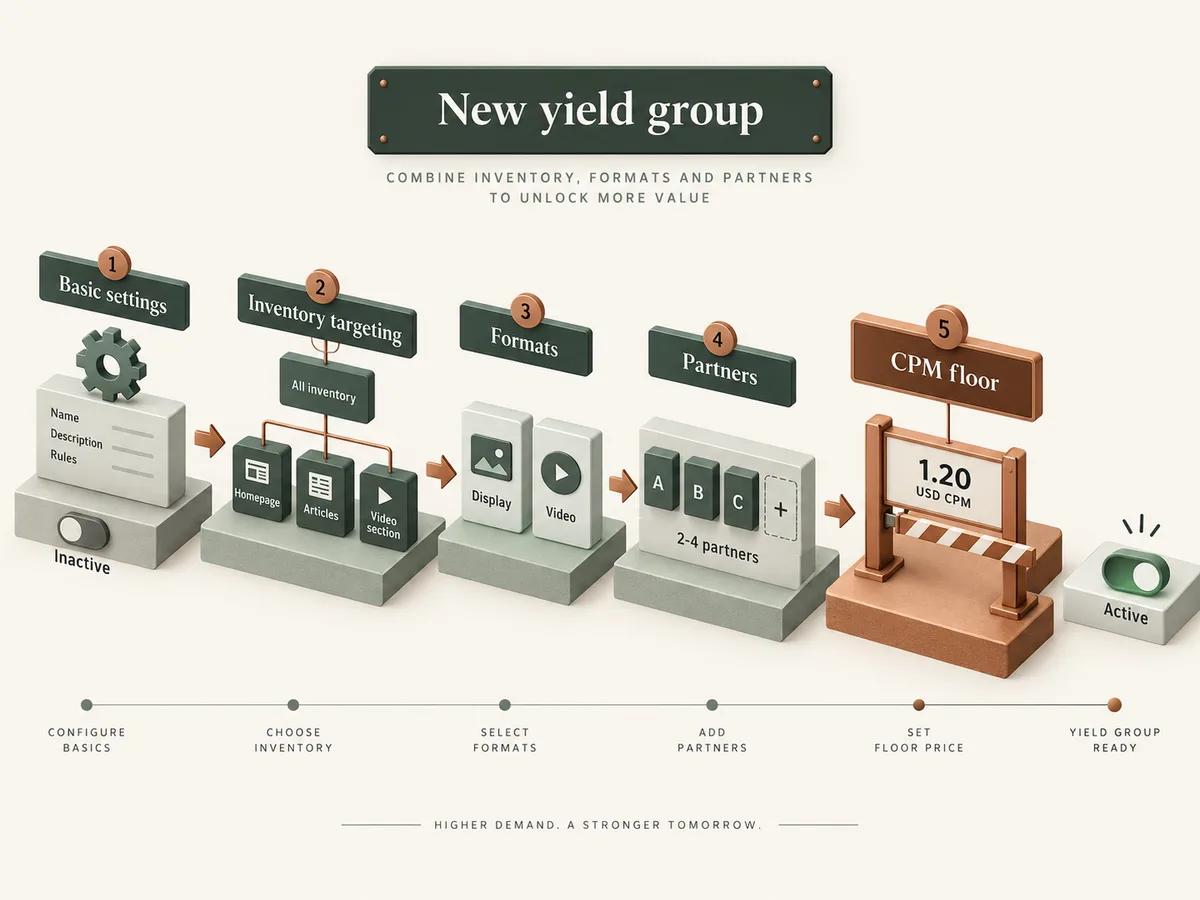
The build itself takes ten minutes if the prerequisites are done. In GAM, navigate to Delivery, then Yield groups, and click New yield group. The interface presents five configuration areas: basic settings, inventory targeting, formats, partners, and floors. Work through them in order.
Start with basic settings. Name the group with a convention that encodes its purpose, for example OB-display-ROS-floor120 for an Open Bidding display group running across all inventory with a 1.20 floor. Names seem trivial until you manage fifteen groups and cannot remember which one controls video demand on your article pages. Add a description that states the group's intent, because your future self and your ad ops colleagues will read it.
Set the status to active or inactive, and leave it inactive until QA completes. Next, define the environment: web, app, or both. For app inventory, select the mediation option if you want mediation networks rather than Open Bidding partners in the group. Web and app demand behave differently, and mixing them in one group without targeting discipline creates confusion in reporting.
Inventory targeting comes next. Target the ad units and key-values that define the inventory slice this group should compete on. The best practice here is segmentation rather than blanket coverage. Build separate groups for high-value inventory (above the fold, long session, high-engagement segments) and remnant inventory, because the optimal floor differs by segment. If your site has a clear content split, such as news versus evergreen guides, and those segments monetize differently, key-value targeting lets each segment get its own competitive configuration.
Format selection follows. Choose display, video, or both, and for video select the environment and player requirements. VAST video demand through Open Bidding requires correct API framework settings and duration handling, and mismatches between the declared video metadata and the actual player produce low match rates. For CTV and OTT inventory, verify the app-ads.txt file and the video format declarations before expecting meaningful fill.
Now add partners. Click add partners and select from the list of Open Bidding or mediation partners enabled for your network. You can add multiple partners to one group, and they compete against each other within the group and against everything outside it in the unified auction. A sensible starting configuration is one group with two to four partners per format and inventory segment. Adding ten partners to a single group dilutes your ability to set meaningful floors, because one floor applies to all of them.
Finally, set the CPM floor. The floor is a minimum price, in the currency of your network, below which the partner's bids do not compete. Floors in yield groups apply per partner or per group depending on the configuration, and the floor is the single highest-impact lever you control. Set it too low and partners win only scraps. Set it too high and partners stop bidding, and you lose the competitive pressure they put on AdX. Start with a floor slightly below the average CPM that segment earns from open exchange demand, then adjust based on the measurement loop described later in this article.
For publishers managing many inventory segments, the GAM API exposes the YieldGroupService API reference, which supports programmatic configuration of yield groups including bulk operations. If you maintain twenty ad units across five languages with distinct floor strategies, script the creation and updates rather than editing each group by hand. Bulk operations through the API also make floor experiments reproducible, which matters when you need to attribute a CPM change to a specific configuration change and nothing else.
Floor Strategy: The Part That Determines Profit
Floors are where yield groups earn their keep, so treat them as an ongoing experiment rather than a one-time setting. The floor you set on a yield group creates a minimum acceptable bid from that group's partners. Because the unified auction evaluates all bids together, a floor on one partner indirectly raises the clearing price for your other demand too, since a suppressed low bid cannot drag down the auction outcome.
The standard starting method is a floor set at 80 to 90 percent of the segment's current open market CPM. If your display inventory above the fold clears at a 1.50 average CPM through open exchange demand, set the Open Bidding floor at 1.20 to 1.35. This positions partner demand to win only when it brings genuine advertiser value, while keeping enough participation to pressure AdX pricing.
From there, iterate in structured steps. Change one floor at a time, wait for a statistically meaningful sample (at minimum three to seven days of data on most properties, longer on low-volume segments), and measure total revenue rather than partner-level revenue in isolation. A floor increase that raises one partner's CPM while cutting its win rate and lowering total revenue is a net loss, and this trap catches publishers who optimize the wrong metric constantly.
Consider floor tiers by inventory value. A common three-tier structure looks like this:
- Premium tier: above-the-fold units and high-engagement segments, floors at or slightly above current average CPM.
- Standard tier: mid-page units on standard content, floors at 80 to 90 percent of average CPM.
- Remnant tier: below-the-fold and low-engagement segments, floors at 40 to 60 percent of average CPM, or no floor where fill matters more than price.
Each tier gets its own yield group, which is why the naming convention from the build section matters. Publishers who run this structure typically see the largest gains on the premium tier, where advertisers concentrate budgets and underpricing is most expensive.
QA Before You Activate
Activate nothing until you have verified the configuration end to end. QA for yield groups has five checks, and each one catches a specific failure mode we see repeatedly.
Check one: targeting verification. In the yield group detail view, confirm the targeted ad units match your intent, and use the delivery forecast or a test page to confirm the group actually serves. A yield group that targets correctly but receives zero bid requests usually indicates an ad unit mismatch or a format declaration error.
Check two: partner status. Open each partner in the group and confirm its status is active, not paused or pending. Partners pending integration approval will show in the group but return no bids, which is indistinguishable from a floor problem in reporting if you do not check the status field directly.
Check three: ads.txt validation. Fetch your ads.txt file and confirm every partner in the group appears with the correct publisher ID and relationship type. Do the same for app-ads.txt if you target app inventory. A crawlable error here costs revenue silently for weeks.
Check four: floor sanity. Compare each floor against the segment's recent CPM data. A floor above the segment's 90th percentile bid will suppress nearly all partner participation, and you will read the resulting flat line as partner weakness rather than floor error.
Check five: test transactions. Serve test impressions on a staging page or a low-traffic URL and confirm in GAM reporting that the yield group logs bid requests and, ideally, bids. Bid request volume with zero bids points to a floor or format mismatch. Zero bid requests points to targeting or integration failure. This distinction saves hours of debugging.
After all five checks pass, set the group to active and let it run untouched for your measurement window. Changing configuration mid-window destroys your ability to read the results.
Measurement and the Optimization Loop
Measure yield groups in GAM reporting under the Yield groups report dimension, and always evaluate three metrics together: bid rate, win rate, and revenue. Bid rate tells you whether partners see and respond to your inventory. Win rate tells you whether your floors position them to compete. Revenue tells you whether the whole arrangement makes money.
The optimization loop runs on a weekly cadence for most publishers. Pull the yield group report segmented by partner, format, and inventory tier. Identify partners with high bid rates and low win rates, which signals floors set too high for their genuine demand level, and partners with high win rates and low CPMs, which signals floors set too low. Adjust one variable per group per cycle, document the change, and measure the next window against the previous one.
Watch the interaction with your other demand. Because yield group partners compete in the unified auction alongside AdX and any header bidding demand, a new yield group can shift win share away from Prebid line items without changing total revenue. Pull your GAM reporting by demand source before and after each change so you can see the full picture rather than the yield group slice alone. Publishers running Prebid alongside Open Bidding partners in GAM need this combined view, because we push header bidding demand and Open Bidding participation into the same auction and report both sides for our publishers.
Seasonality affects the loop. Q4 demand lifts all floors' effectiveness, and January softens them, so revisit floor levels quarterly at minimum. Publishers who set floors once and never touch them typically leave measurable revenue on the table within two quarters as advertiser demand shifts.
Common Setup Mistakes and How to Avoid Them
Four mistakes account for most underperforming yield group configurations we audit.
The first is the single mega-group: all partners, all formats, all inventory, one floor. This configuration is easy to build and impossible to optimize, because a floor correct for video on premium inventory is wrong for display on remnant pages. Segment by format and value tier, even if that means five groups instead of one.
The second is floor abandonment: partners added with zero floors, which reduces them to bottom-feeders that win only impressions AdX rejects. Open Bidding demand with no floor rarely improves total revenue; it mostly adds latency and complexity. Every partner in a yield group deserves a floor hypothesis, even a conservative one.
The third is stale ads.txt: partners added to groups without corresponding ads.txt lines. The bids get rejected downstream, the report shows healthy bid rates with zero revenue, and the publisher concludes the partner has no demand when the partner never had a chance to transact. Audit ads.txt whenever you add or remove a partner.
The fourth is metric myopia: optimizing partner CPM instead of total revenue. A partner whose CPM rises while its win share collapses is contributing less, not more. Total revenue across the unified auction is the only number that pays invoices, so make it the primary KPI for every floor decision.
Working With a Partner on Yield Group Strategy
Running yield groups well requires demand worth flooring. The configuration matters only when the partners in the group bring real advertiser budgets, which is why the demand layer deserves as much attention as the GAM settings. Our WireAds SSP aggregates Prebid, OpenRTB, Google MCM with AdX access, and direct deals from brand agencies into a single bidding pool, so publishers configuring yield groups in GAM have concentrated demand to compete rather than a list of thin partners.
We pay Net 30, we work CPM-based, and we operate globally across web, app, and CTV/OTT in every country where Google monetization is available. For publishers who want the yield group strategy handled end to end, from floor design through QA through the weekly optimization loop, our monetization services team runs the full stack: header bidding, yield group configuration, and unified reporting. Whether you build it in-house or with a partner, the sequence is the same: clean prerequisites, segmented groups, tested configuration, and a measurement loop that never stops running. The publishers who profit most from yield groups are the ones still adjusting floors a year after setup, because the auction rewards attention and punishes neglect.