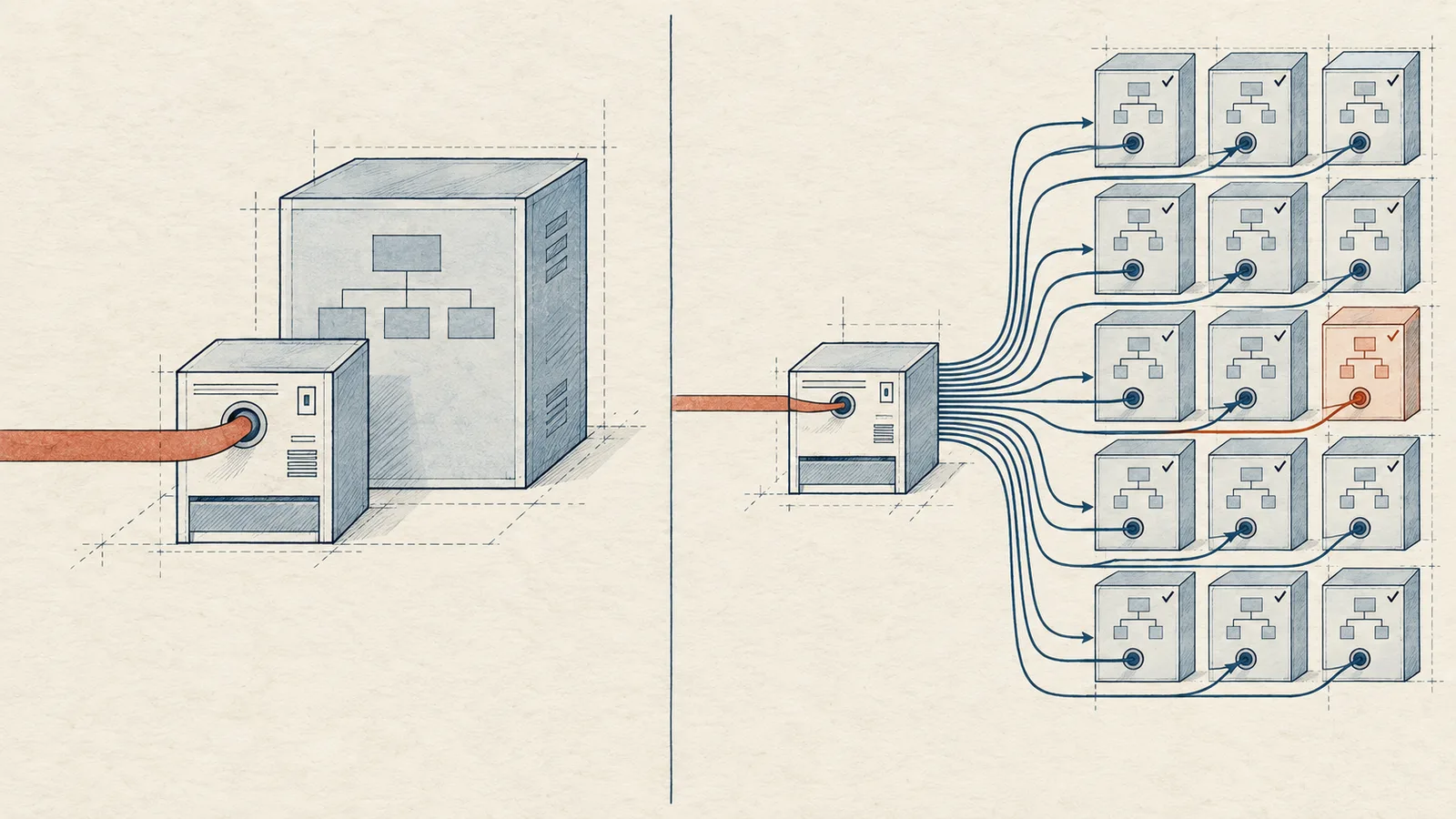

Under Google's Multiple Customer Management (MCM) program, a partner can either run your entire Ad Manager account or only represent your inventory to Authorized Buyers. That single design choice, fixed at the moment you accept an invitation, decides who controls your line items, your floor prices, your reporting, and ultimately most of your CPM. Many publishers sign with an MCM partner after comparing revenue share percentages alone, then discover they have handed over the keys to their ad stack. This article gives you a selection checklist, explains why Manage Inventory (MI) delegation preserves your operational freedom, and shows what a well-run MI partnership looks like in practice.
What Google MCM Is and What a Partner Actually Does
Multiple Customer Management, usually shortened to MCM, is Google's framework for connecting publishers to Google Ad Exchange demand through a parent publisher. The parent holds the AdX relationship, and each child publisher it manages appears in its sellers.json with a valid SupplyChain object, which is how Authorized Buyers verify that the inventory they bid on comes from a legitimate source. Google does not treat the parent as a mere technical intermediary, though. Google's Ad Manager partner guidelines are explicit on one point: the child publisher must own its sites and remains responsible for policy violations on them. The relationship is commercial in both directions. The parent takes a revenue share, and the child keeps accountability for content.
The commercial terms live inside the invitation itself. According to Google's official MCM overview, the parent sets a pre-agreed revenue share between 0 and 100 percent, and earnings reach the child through auto-payment. That percentage, and what you get in exchange for it, sits at the core of the partner decision. Two partners with identical revenue shares can deliver wildly different results depending on the demand they attach to your inventory and the delegation type they impose on you.
Manage Account vs Manage Inventory: The Decision That Shapes Everything
MCM offers two delegation types, and they differ far more than most publishers realize at signing time.
Manage Account (MA) gives the parent full control of your Ad Manager account. The parent creates and edits your line items, sets your floor prices, manages your demand setup, and decides what you can see in reporting. You receive earnings, but you no longer operate your own ad stack. If you want to test a new floor, connect a demand partner through Prebid, or restructure your ad units, you file a request and wait in someone else's queue.
Manage Inventory (MI) keeps your Ad Manager account in your hands. The parent delegates specific inventory to Google's demand, and you continue to traffic your own line items, run your own Prebid.js or Prebid Server setup, adjust floors, and read full reporting. The parent's role narrows to what it should be: providing the AdX relationship, the sellers.json entry, and the demand quality it can attach to your inventory.
The practical difference shows up within weeks. Under MA, every optimization passes through the parent's schedule and priorities. Under MI, you experiment at your own pace, and your partner's value has to prove itself daily through CPMs and fill rate rather than through lock-in.
The Selection Checklist
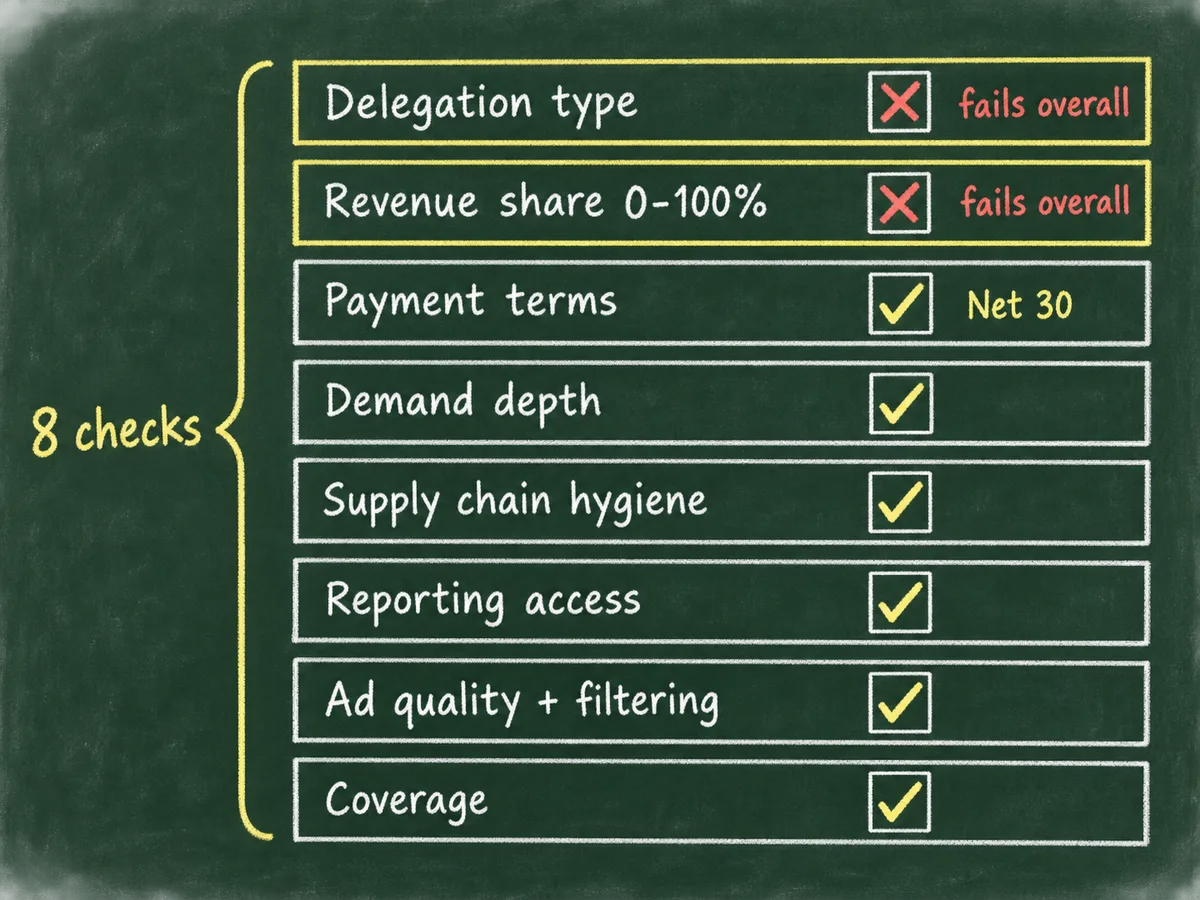
Evaluate any prospective MCM partner against the following eight points before you accept an invitation. None of them is optional, because each one maps to a concrete risk: lost control, opaque economics, or rejected bid requests downstream.
- Delegation type. Ask whether the partner offers Manage Inventory, not only Manage Account. A partner that pushes MA exclusively wants control of your stack, and that control rarely benefits you.
- Revenue share transparency. Get the exact percentage in writing and confirm it matches the invitation in Ad Manager. Then ask what the share covers: bare access to AdX demand, or the partner's full stack including header bidding and direct deals.
- Payment terms. Check the schedule and the minimum threshold. We pay Net 30 at WireAds, and you should treat anything longer than Net 60 as a warning sign, because the parent collects from Google on a fixed cycle and holds your money in the meantime.
- Demand depth. MCM access alone is worth little if the partner adds nothing on top of it. Ask how the partner combines Google AdX with header bidding through Prebid, OpenRTB connections to exchanges and DSPs, and direct deals from agencies. Layered demand is what lifts CPMs.
- Supply chain hygiene. The partner must maintain a correct sellers.json entry for you, hand you the exact ads.txt lines for your site, and pass a valid SupplyChain object on every bid request. Errors here cause Authorized Buyers to flag or skip your inventory entirely.
- Reporting access. Insist on full Ad Manager reporting plus the partner's own dashboard. A partner that shows you only a monthly total is withholding the information you need to optimize.
- Ad quality and filtering. Ask how the partner filters malvertising, redirects, and low-quality creatives. Strict filtering protects both your CPMs and your users, and a partner that cannot describe its process has not built one.
- Coverage. Confirm support for your geographies, formats, and platforms. If you run web, in-app, or CTV/OTT inventory, the partner needs demand and technical support for all of it, not just display banners in a handful of markets.
Score each item plainly. A partner that fails on delegation type or revenue share transparency fails overall, regardless of how strong the remaining answers look.
Why Manage Inventory Preserves Your Operational Freedom
We believe MI is the right delegation type for almost every professional publisher, and we built our own MCM program around it. The reasoning is mechanical rather than ideological.
Under MI, your ad stack stays yours. You keep your Ad Manager account, your line items, your floor logic, and your Prebid configuration, so a partner switch costs you an ads.txt edit rather than a full migration. You can layer the parent's demand on top of what you already run, compare performance side by side, and keep whichever setup earns more. Under MA, leaving a bad partner means rebuilding your entire account from scratch, which is exactly why some partners prefer MA in the first place.
MI also keeps incentives honest. Because you can see everything and change anything, the partner has to win your inventory on merit: higher CPMs, better fill, cleaner ads. Lock-in stops working as a business model.
The WireAds SSP operates on exactly this principle. We combine Google MCM and Google AdX demand with Prebid, OpenRTB, and direct deals from global and local brand agencies, and all of it bids against your ad spaces through our SSP. You keep full control in Ad Manager while we push our demand in, which is the division of labor MI was designed for.
Red Flags That Should End the Conversation
Some signals tell you everything before you sign anything. Treat each of the following as a reason to walk away.
- The partner offers only Manage Account and frames it as a convenience. Ask yourself: convenience for whom?
- The revenue share is "negotiated after onboarding." The share is fixed in the invitation, so a partner that delays the number plans to set it once you depend on them.
- Payment terms exceed Net 60, or the partner cannot state them at all.
- The partner cannot produce the exact ads.txt lines and sellers.json structure you would need.
- You get no access to Ad Manager reporting, only a summarized partner dashboard.
- The partner cannot describe its creative filtering. Malvertising slips through unfiltered demand, and your users blame you, not the partner.
- Support runs through an anonymous ticket queue with no named contact. Ad operations problems need answers in hours, not weeks.
Any one of these justifies ending the conversation. The MCM market is large, demand partners compete for quality inventory, and you hold more leverage than the outbound sales emails suggest.
Questions to Ask Before You Accept the Invitation
Turn the checklist into a short call script. Ask these questions in order and record the answers verbatim:
- Do you offer Manage Inventory delegation?
- What is the exact revenue share, and what does it include?
- What are your payment terms and minimum payout threshold?
- Which demand sources do you layer on top of AdX, and how do you combine them in the auction?
- What ads.txt lines will I need, and how does my sellers.json entry look?
- What reporting do I get, and how often?
- How do you filter creatives and handle malvertising reports?
- Which geographies, formats, and platforms do you support?
A competent partner answers all eight without hesitation, because these questions describe its daily operations. Hesitation on any single answer tells you the partner has not solved that problem for its existing publishers, and you would become the test case.
What Onboarding Should Look Like
A well-run MCM onboarding takes days, not months, and it follows a predictable sequence. Google defines readiness states and onboarding steps for each phase, and you can Check child publisher readiness directly in Ad Manager at any point. Your partner should walk you through those states rather than leaving you to interpret them alone.
Expect the following flow. First, you verify site ownership, because you must own every site you register and you remain responsible for policy compliance on it. Second, the partner sends the MCM invitation with the agreed revenue share, and you accept it in Ad Manager. Third, you update your ads.txt with the partner's lines so Authorized Buyers can validate the supply path through sellers.json and the SupplyChain object. Fourth, the partner attaches its demand, and you watch the first bids and impressions land in reporting together. Fifth, you ramp traffic while monitoring CPMs, fill rate, and viewability against your previous setup.
At each step the partner should hand you concrete artifacts: the exact ads.txt lines, the invitation details, a go-live date, and a reporting walkthrough. If onboarding consists of a signup form followed by silence, expect the same communication style after you go live.
What a Working MI Partnership Looks Like at WireAds
We run our MCM program as a Manage Inventory partner, and our monetization services map to the checklist above point by point.
Our demand comes from Google AdX through MCM, from exchanges and DSPs connected over OpenRTB, from Prebid-based header bidding, and from direct deals we hold with global and local brand agencies. We push all of it into our SSP so every source bids against your ad spaces, and we filter demand strictly: no unwanted creatives, no malvertising, no redirects. We pay Net 30, we work globally in every country with Google monetization, and we support web, app, and CTV/OTT inventory.
Because we operate under MI, you keep your Ad Manager account and your decision rights. You watch our CPMs next to your existing setup, you adjust your own floors, and you keep whatever wins. If the partnership stops earning its place, you replace an ads.txt line and move on. That is the entire point of choosing MI: performance has to retain you, not paperwork.
If you want to run this checklist against a live partner, talk to the WireAds team. We will answer the eight questions above on the first call, in writing, before you accept anything.